How to identify and protect high risk admin accounts with Axonius
In most organizations, super-admin reviews get treated like any other entitlement audit — periodic, backlogged, and rarely finished. That's a higher-stakes miss than it looks. A super administrator of an MDM, identity provider, or security tool can disable detection controls, reassign global roles, or wipe every managed device before anyone notices the account was compromised.
In March 2026, a nation-state attacker compromised a Microsoft Intune Administrator account, created a new Global Administrator, then pushed wipe commands to roughly 200,000 devices across 79 countries — including enrolled BYOD endpoints of a global medical technology company. Okta's 2023 cross-tenant campaign and Snowflake's admin account targeted campaign follow the same pattern: one super-admin account, taken, rewrites the security posture of the entire environment.
Super administrative accounts carry large privileges and sit in many different places: from your identity provider, to user directory, collaboration suite, code repos, endpoint-management console and much more. This post builds the combined list across those control planes, then intersects each with a control failure.
1. How to identify super admins in critical systems
Privilege is granted here, and one change propagates everywhere else.
1.1 Identify every super admin
To identify users (regardless of system) that are either super administrators or have administrative permissions, go to Assets > Identities > Users and then run the query:
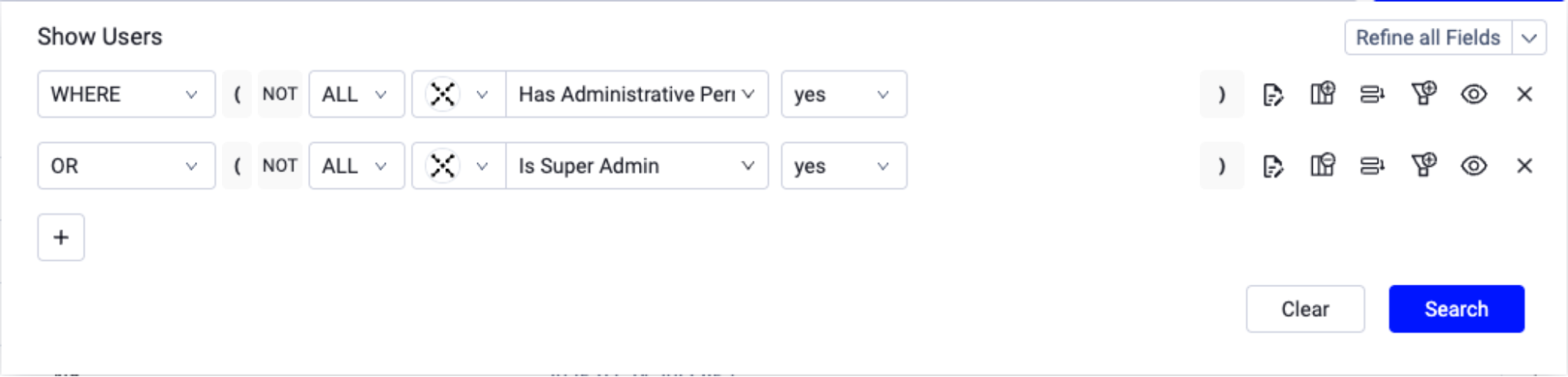
("specific_data.data.has_administrative_permissions" == true) or ("specific_data.data.is_admin" == true)
1.2 Identify super admins in critical systems
To focus on super admins of critical systems, go to Assets > Identities > Users and narrow the query by adapter. Here's an example scoped to GitHub, Okta, and Azure AD:
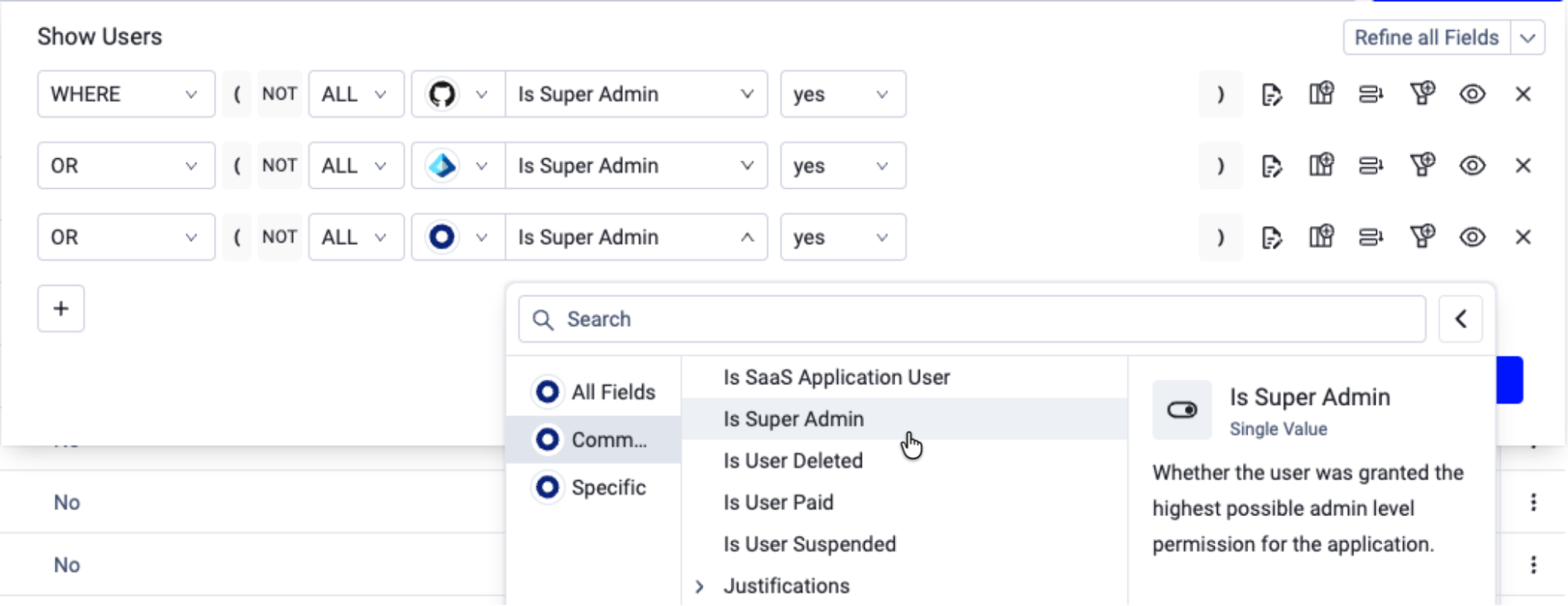
("adapters_data.github_adapter.is_admtrue) or ("adapters_data.azure_ad_adapter.is_admin" == true) or ("adapters_data.okta_adapter.is_admin" == true)
Note: The same pattern applies across other super admin accounts in Axonius, ranging from MDMs, Productivity, Network security and more.
1.3 Identify admins across every grant path
Super admin privileges can be granted directly or via transitive permissions, like nested groups, roles, and entitlements. To find admins at the transitive level in Active Directory, go to Assets > Identities > Users and run:
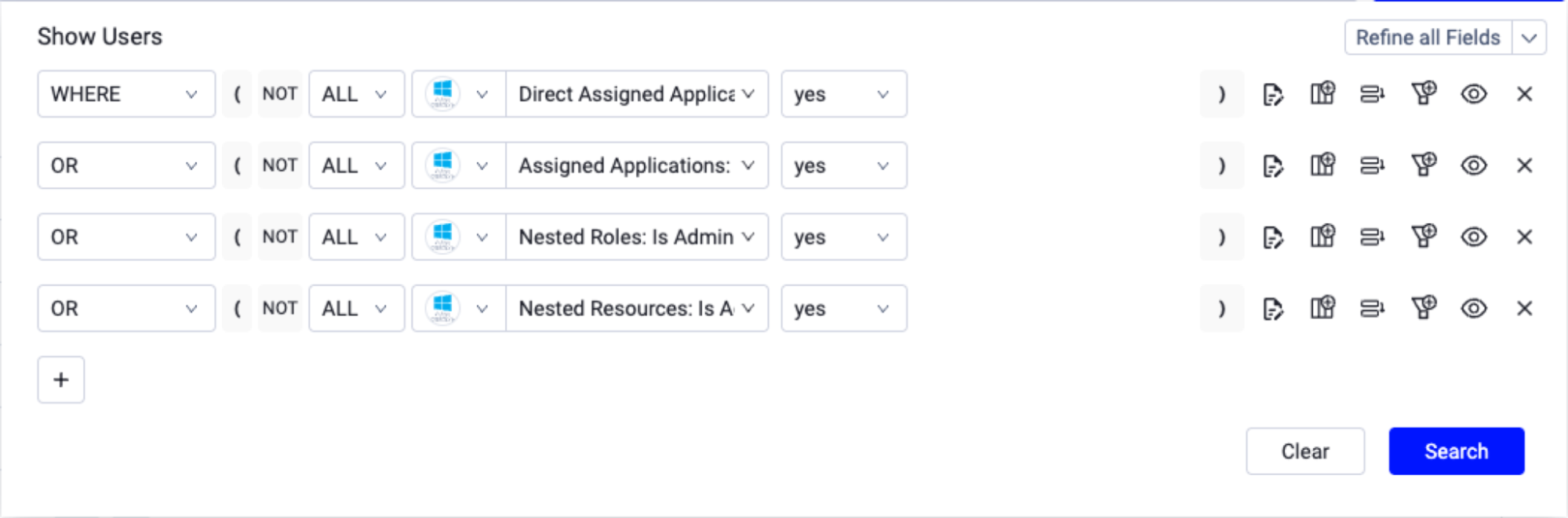
(("adapters_data.active_directory_adapter.user_permissions.is_admin" == true) or ("adapters_data.active_directory_adapter.associated_groups.is_admin" == true) or ("adapters_data.active_directory_adapter.user_apps.is_admin" == true) or ("adapters_data.active_directory_adapter.nested_roles.is_admin" == true))
Note: The same pattern applies across other super admin accounts in Axonius, with transitive access mirroring the authorization policy of the system (i.e. in Okta, admin access is granted directly and via groups, in Active Directory, via Roles, Groups, and Permissions, etc.).
1.4 Identify the admin roles themselves
Roles tell you what exists to be held. Go to Assets > Identities > Security Roles and run:
("specific_data.data.is_admin" == true)
This is the role inventory, not the assignment map; cross it against 1.1 to find roles nobody currently holds.
2. How to identify security risks in super admin accounts
After you identify super admins, you can look at coverage gaps. Examples of gaps include:
2.1 Super admins with weak authentication
In Assets > Identities > Users, run the following to find super admins without strong authentication factors (like phishing-resistant MFA):
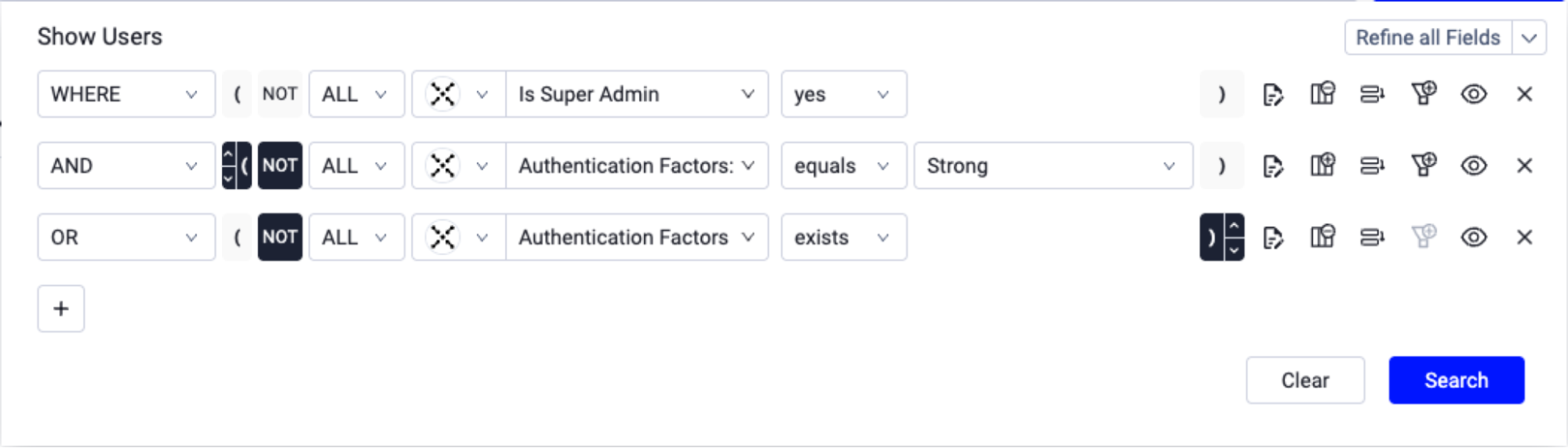
("specific_data.data.is_admin" == true) and (not ("specific_data.data.user_factors.strength" == "Strong") or not ((("specific_data.data.user_factors" == ({"$exists":true,"$ne":[]})) and "specific_data.data.user_factors" != [])))
2.2 Super admins with credentials in data breaches
In Assets > Identities > Users, run the following to find super admins with credentials in breach catalogs like HaveIBeenPwned:
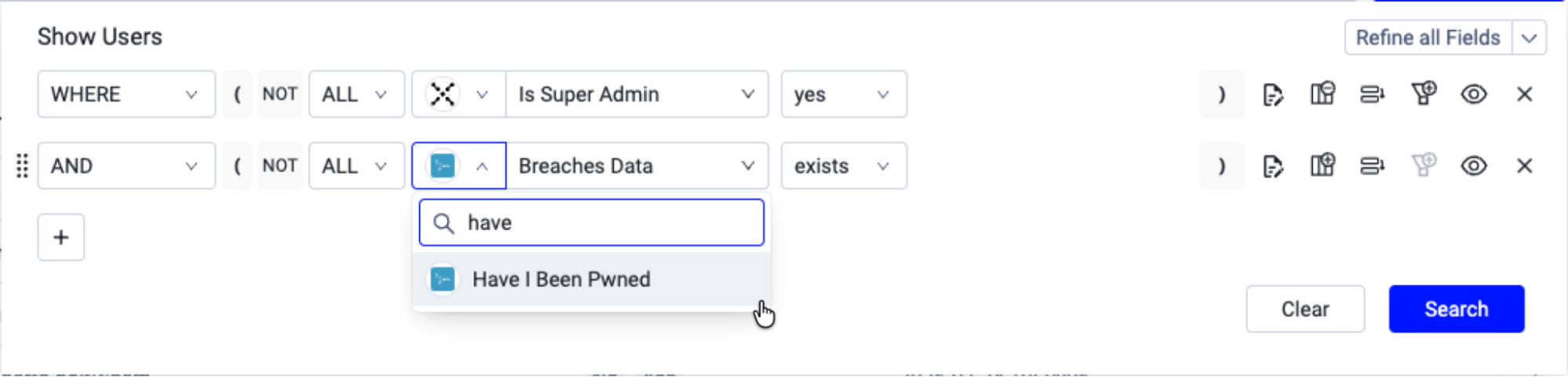
("specific_data.data.is_admin" == true) and ((("adapters_data.haveibeenpwned_adapter.breaches_data" == ({"$exists":true,"$ne":[]})) and "adapters_data.haveibeenpwned_adapter.breaches_data" != []))
2.3 Super admin accounts associated with disabled employees
In Assets > Identities > Users, run the following to find active super-admin accounts tied to employees Workday has marked inactive:
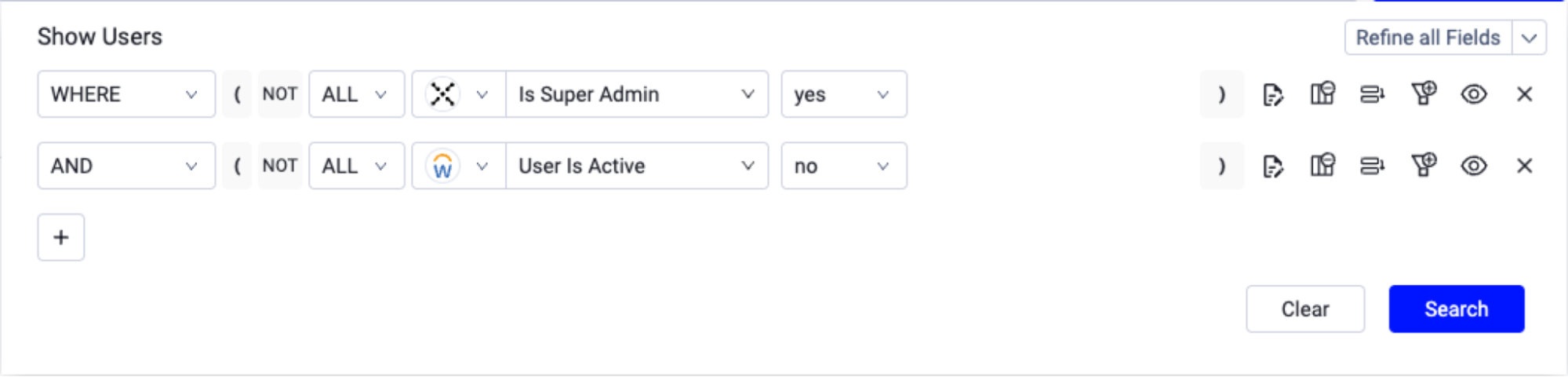
("specific_data.data.is_admin" == true) and ("adapters_data.workday_adapter.is_user_active" == false)
2.4 Super admin accounts with passwords that never expire
In Assets > Identities > Users, run the following to find super admins with non-expiring passwords:
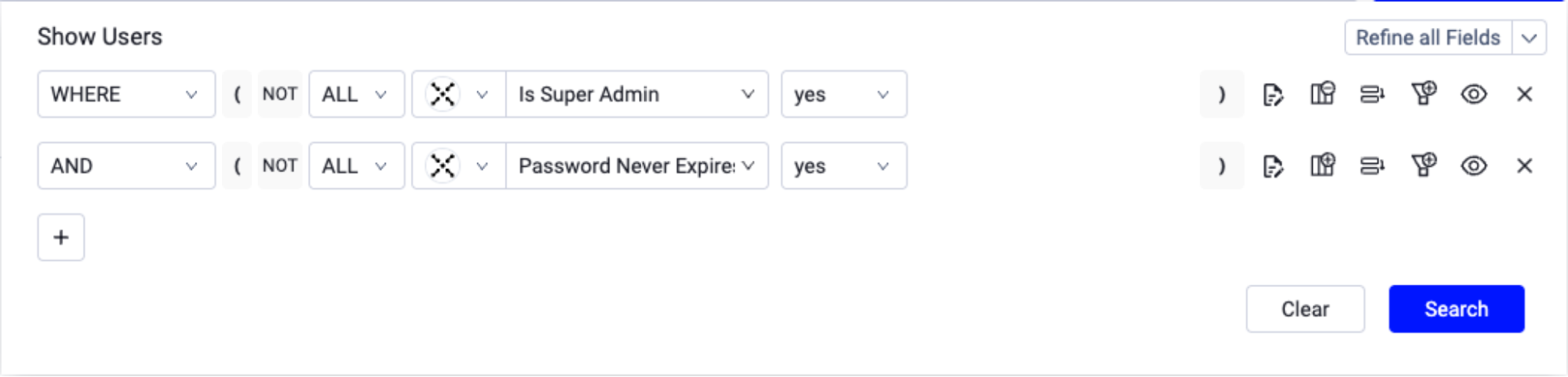
("specific_data.data.is_admin" == true) and ("specific_data.data.password_never_expires" == true)
From any of these results, export a CSV for offline review, or configure an Enforcement Set in the Action Center to route findings to a ticket or trigger a review workflow. See the Action Center overview.
3. Mitigation and remediation advice
To reduce risk in super admin accounts:
Reduce the number of super administrators.
For accounts operated by humans, require phishing-resistant factors (like Yubikeys, Okta Verify, and Passkeys).
Rotate passwords of accounts that never expired or got breached.
Replace standing rights with time-bound elevation and privileged access.
Monitor activity and either transfer or deactivate accounts without an active owner.
Implement Zero Trust best practices and compensating controls (like enabling auth/access only from known IPs in your zero trust network from jump servers or only devices with your MDM/EDR controls).
To automate detection and remediation of super admin account issues over time, go to Action Center > Workflows (or Enforcements) and set up detection and remediation logic. Here's an example that automatically detects super admin accounts found in data breaches (example 2.2), and proactively raises monitoring sensitivity on SIEM, revokes active sessions on both SSO and the Zero Trust Network, resets the credential, and sends a Slack notification for key stakeholders.
[PLACEHOLDER FOR VIDEO: https://drive.google.com/file/d/14JugTRPY2Go03KSnTlah4jk3mV8KT9RY/view?usp=drive_link]
Learn more
External resources
Okta Security: Cross-Tenant Impersonation — Prevention and Detection
Microsoft Security: Midnight Blizzard — guidance for responders on nation-state attack
Google Cloud / Mandiant: UNC5537 targeting Snowflake customer instances
Axonius resources
Every one of these super admin accounts was created for a good reason, on a day when the missing control seemed like it could wait. The one that gets taken will be the one nobody has looked at since. This same gap exists in most environments today, scattered across silos. Axonius surfaces those accounts across identities and 40+ other asset types, identifies which controls have already failed, and gives you the Action Center to close the gaps. To see it in action, schedule a meeting with one of our specialists.
Categories
- Threats Vulnerabilities

Get Started
See how to make asset intelligence actionable with a guided demo:
- Stop chasing data — work from one asset model your entire team can trust.
- See what's exposed before it's a problem — surface coverage gaps automatically.
- Turn alert noise into action — cut thousands of alerts down, to the ones that matter.