Main takeaways:
CVE-2026-124194 is an exploited flaw in classic Outlook for Windows that can expose a user’s NTLMv2 hash. This post covers affected versions and fixed builds and how to identify and remediate vulnerable assets.
CVE-2026-124194 Overview
What happened. On November 10, Microsoft fixed CVE-2026-124194, a flaw in classic Outlook for Windows that attackers were already exploiting. When a user opens a crafted message file, Outlook connects to an attacker's server without its usual warning. Windows then sends that server the user's NTLMv2 hash over SMB or WebDAV. CISA added the CVE to its Known Exploited Vulnerabilities (KEV) catalog the same day.
Why a Moderate rating undersells it. Microsoft scores the flaw 6.5, but a stolen hash is a starting point. Attackers can crack it offline or relay it live to log in to file shares, LDAP, Active Directory Certificate Services or Exchange as that user. A certificate obtained through AD CS keeps working after the user resets their password. Outlook users with admin rights carry the highest risk.
Why your Windows patch status may say you're safe. The fix ships in the Office update, not in Windows Update. A device can show every Windows patch installed and still run a vulnerable Outlook. Microsoft 365 Apps also fixes the flaw at a different build in each update channel, so one version cutoff gives the wrong answer. So "are we exposed?" is a software inventory question, not a patch question. Answering it means reconciling what your tools record separately: which devices run classic Outlook, which Office build each one is on, and who uses it.
Why speed matters. Microsoft credits a researcher who used Claude to find this flaw. As AI speeds up discovery, the scoping step can't wait for a quarterly inventory.
What the CISA mandate requires. Under BOD 26-04, federal civilian agencies must fix this flaw by November 24. The deadline is 14 days because the CVE is in the KEV catalog but sits on workstations, not internet-facing systems. The directive also requires agencies to tag every asset they manage, so the work starts with knowing where classic Outlook runs.
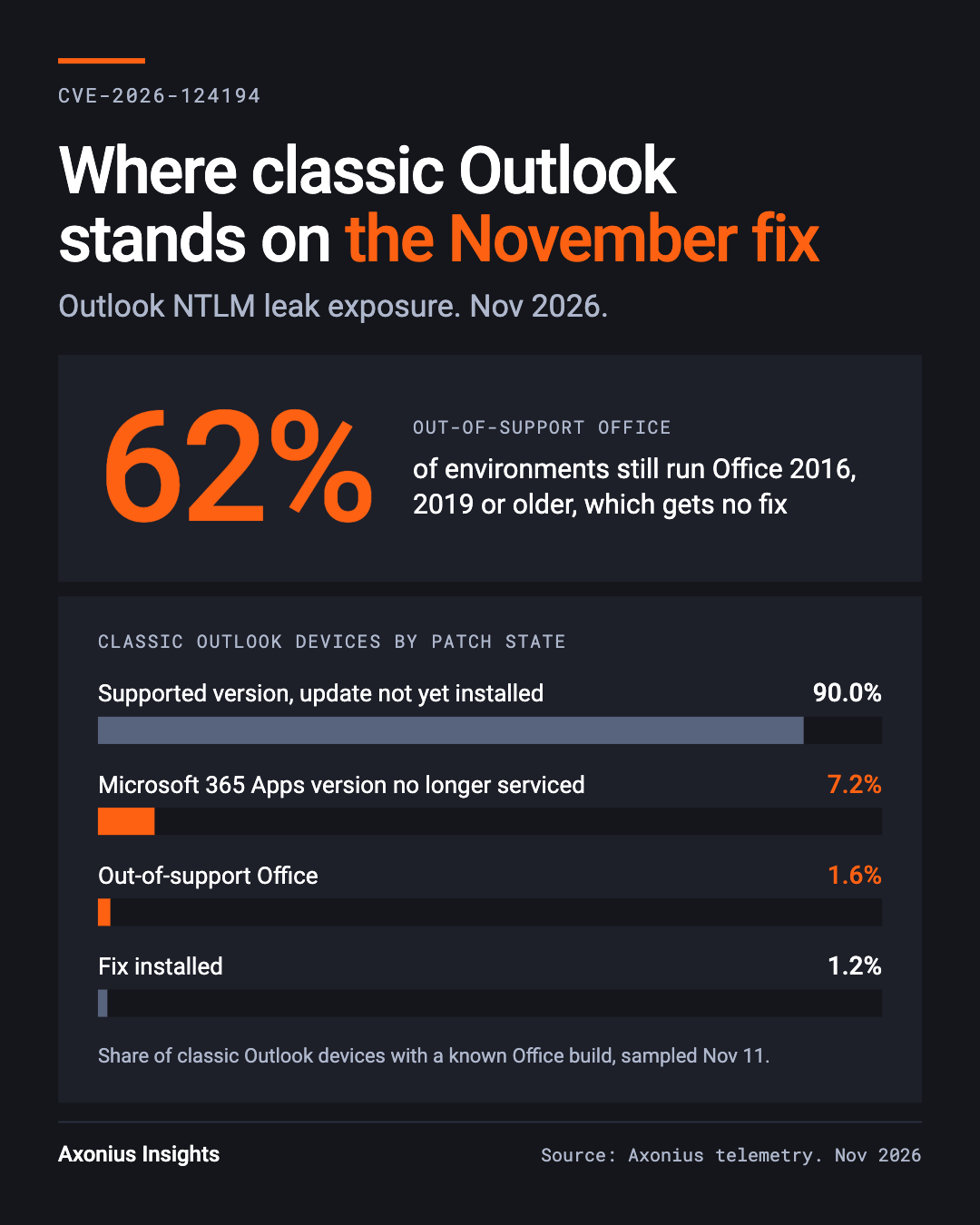
Who should investigate. Any organization running classic Outlook from Microsoft 365 Apps for enterprise, Office LTSC 2021 or Office LTSC 2024. Office 2016 and 2019 are out of support and won't receive a fix, so treat them as exposed. In Axonius data, 62% of environments still run out-of-support Office. New Outlook for Windows, Outlook on the web, Mac and mobile are not affected.
Timeline
Date (2026) | Event |
Nov 6 | CVE-2026-124194 is reserved. |
Nov 10 | Microsoft's November Patch Tuesday fixes more than 1,000 CVEs, a record by several counts. CVE-2026-124194 is the only one flagged as exploited. |
Nov 10 | Microsoft fixes the flaw in the November Office updates and flags it as exploited. Researchers Benoit Sevens (using Claude with Anthropic) and "nono" are credited. |
Nov 10 | CISA adds the CVE to the Known Exploited Vulnerabilities catalog, with a November 24 remediation deadline for federal agencies under BOD 26-04. |
Nov 10 | Microsoft 365 Apps version 2607 reaches end of service on the Monthly Enterprise and Semi-Annual channels. Devices still on 2607 get no fix until they move to a newer version. |
Nov 24 | BOD 26-04 remediation deadline for U.S. federal civilian agencies: 14 days for a KEV-listed flaw on assets that aren't internet-exposed. |
Dec 7 | BOD 26-04's 180-day mark: federal agencies must be meeting the new remediation timelines and continuously tagging exposed assets. |
Dec 8 | Microsoft 365 Apps version 2608 reaches end of service on the Monthly Enterprise and Semi-Annual channels. Devices patched on 2608 must move to 2609 or later to keep getting fixes. |
What to do now
Install the November 10 Office update on every classic Outlook device, block the paths that leak the hash, and plan to retire Office 2016 and 2019. In Axonius data, 90% of classic Outlook devices only need the November update. The other 8.8% run versions that need an upgrade or replacement first.
Steps:
Find every device running classic Outlook and record its Office version and build (the build number tells you the channel). Your Windows patch status won't tell you.
Install the November 10 Office update. Click-to-Run installs the update only after users close Office apps, so force a restart or close the apps.
Block outbound SMB (TCP 445 and 139) to the internet. Stop the WebClient service where you don't use WebDAV, because Windows can fall back to it.
Add privileged accounts to the Protected Users group, and restrict outgoing NTLM where your apps allow it.
Close relay paths: require SMB signing, LDAP signing and channel binding, and Extended Protection on AD CS and Exchange.
Move devices on Microsoft 365 Apps versions Microsoft no longer services to a supported version, and replace Office 2016 and 2019. No fix will ship for them.
Fix Paths:
Edition | Update channel | Versions |
Microsoft 365 Apps, Current Channel | Click-to-Run, on the device's update channel | Version 2610, build 20527.20196 or later |
Microsoft 365 Apps, Monthly Enterprise | Click-to-Run, on the device's update channel | Version 2610, build 20527.20194 or later |
Microsoft 365 Apps, Monthly Enterprise | Click-to-Run, on the device's update channel | Version 2609, build 20430.20264 or later |
Microsoft 365 Apps, Monthly Enterprise | Click-to-Run, on the device's update channel | Version 2608, build 20326.20320 or later |
Microsoft 365 Apps, Semi-Annual Enterprise | Click-to-Run, on the device's update channel | Version 2610, build 20527.20192 or later |
Microsoft 365 Apps, Semi-Annual Enterprise | Click-to-Run, on the device's update channel | Version 2609, build 20430.20262 or later |
Microsoft 365 Apps, Semi-Annual Enterprise | Click-to-Run, on the device's update channel | Version 2608, build 20326.20318 or later |
Office LTSC 2024 | Click-to-Run, monthly security updates only | 16.0.17932.21140 or later |
Office LTSC 2021 | Click-to-Run, monthly security updates only | 16.0.14334.21048 or later |
Office 2016 or 2019 | No longer updated | Upgrade to a supported edition |
Assess your exposure with Axonius
Find every classic Outlook install below its channel's fixed build, including on devices that look fully patched in Windows, and see who uses each one. Axonius reconciles what Intune, MECM, your EDR and your scanners report about each device, so the answer doesn't depend on any single console.
Axonius AI Companion prompt:
1. Do I have any open Security Findings for CVE-2026-124194?

2. If not, find Windows devices running Microsoft 365 Apps, Office LTSC 2021, or Office LTSC 2024 that are below these November 10 fixed builds (compare by installed software name and version):

- Current Channel 2610: 16.0.20527.20196
- Monthly Enterprise: 16.0.20527.20194, 16.0.20430.20264, 16.0.20326.20320 - Semi-Annual: 16.0.20527.20192, 16.0.20430.20262, 16.0.20326.20318
- LTSC 2024: 16.0.17932.21140
- LTSC 2021: 16.0.14334.21048

3. How many devices are still on Office 2016 or Office 2019? (These won’t receive this patch.)

4. Of the unpatched devices, surface the highest-priority ones by: internet exposure, crown jewel or critical asset status, and privileged AD group membership of the last-used user.

5. Build a patching worklist table on My Dashboard with: hostname, OS version, Office build, device owner, last seen. Also add a donut showing the vulnerable population by OS version.
In the platform: Go to Assets → Aggregated Security Findings and search for CVE-2026-124194. If no results appear (scanners may not have reported this CVE yet), go to Assets → Devices, open the Installed Software column, and search for “Microsoft 365” in the Name field. Any result showing version 16.0.13530.20528 is unpatched. Also search for “Microsoft Office” to find Office 2016/2019 devices (version 16.0.xxxxx on Office 2016, version 16.0.1xxxx on 2019) – these will not receive the November 10 patch and need a separate upgrade track.
Fix with Axonius. Act on the same list, so nothing gets lost between finding and fixing:
Patch: trigger the November 10 Office update through Intune or MECM on every device below its channel's fixed build. Re-run the query to confirm each device reached the fixed build.
Assign: open a tracked Jira or ServiceNow ticket for each device owner, with the device, its current Office build and the build it needs.
Protect admins first: flag privileged users on vulnerable devices for Protected Users review, so a leaked hash can't be used for NTLM sign-in.
Retire what can't be patched: move devices on unserviced Microsoft 365 Apps versions to a supported one, and track every Office 2016 and 2019 device through to replacement.
Evidence and Sources
Microsoft Security Response Center: CVE-2026-124194 (advisory and fixed builds)
CISA Known Exploited Vulnerabilities catalog (KEV listing and deadline)
CISA BOD 26-04: Prioritizing Security Updates Based on Risk (federal remediation deadlines)
Microsoft Learn: Release notes for Microsoft Office security updates (all fixed builds by channel and version)
CISA BOD 26-04: Prioritizing Security Updates Based on Risk (federal remediation deadlines)
Conclusion
AI is finding vulnerabilities faster than patch cycles move. Know what you run before the next one lands. Get a short briefing when the next critical vulnerability lands, with what to scope first.
Book a demo with Axonius today.
Methodology
Findings in this report are based on an anonymized snapshot of de-identified, statistically pooled asset metadata captured on November 11, 2026, across a sample of U.S. enterprise environments. All data points reflect high-level, aggregate cross-sections intended to provide the broader security community with realistic benchmarks for scoping and remediation.